





Lock Down CORS Before It Hands Over Your Session Tokens
The wildcard and reflected-origin mistakes that let any site read your authenticated API, and the strict allow-list that closes them.

CORS feels like a nuisance. You are building a frontend on one domain talking to an API on another, the browser blocks the request, you Google the error, and the top answer says to add a header that makes the red text go away. So you add it, the request works, and you move on. The problem is that the header you just copied may have handed every website on the internet permission to read your authenticated API as if they were your logged-in user. The error went away. The hole stayed open.
CORS, Cross-Origin Resource Sharing, is the browser's mechanism for deciding which other origins are allowed to read responses from your API. It exists because by default the browser blocks one site from reading another site's data, which is what stops a malicious page from quietly pulling your bank balance while you have your bank open in another tab. When you misconfigure CORS, you are not loosening a developer inconvenience. You are dismantling that protection, and a 2025 analysis of over 100,000 web applications found that 35 percent had at least one CORS misconfiguration exploitable to steal credentials or exfiltrate data. More than a third. This is not a rare edge case. It is one of the most common ways teams accidentally give attackers the keys.
The two configurations that hand over the keys
There are two specific mistakes that turn CORS from a guard into a door, and they almost always travel with Access-Control-Allow-Credentials: true, which is what lets cookies and auth tokens ride along on cross-origin requests.
The wildcard with credentials. Setting Access-Control-Allow-Origin: * tells the browser any origin may read the response. On a public, unauthenticated endpoint that serves the same data to everyone, this is fine. The trouble starts the moment that endpoint requires authentication, because now any website a victim visits can request your API. The browser's own rule actually saves you here in one narrow way: the wildcard cannot be combined with Access-Control-Allow-Credentials: true, so a literal * plus credentials is rejected. That rejection lulls teams into thinking they are safe, which leads them straight to the second, worse mistake.
Reflecting the Origin header. To get around the wildcard restriction while still allowing any site, teams write code that reads the incoming Origin header and echoes it straight back into Access-Control-Allow-Origin, then adds Access-Control-Allow-Credentials: true. This is functionally equivalent to a wildcard, except it also permits credentialed requests. Any site can now make authenticated cross-origin requests to your API and read the responses, because your server obediently tells the browser "yes, whatever origin you came from is allowed." An attacker hosts a page, a logged-in victim visits it, the page fires a request to your API, the victim's session cookie goes along automatically, your server reflects the attacker's origin as allowed, and the browser lets the attacker's JavaScript read your user's private data. The attacker now acts as the user without ever knowing their password. This is the same family of cross-site trust failure that breaks OAuth logins when SameSite is set to strict: a cookie setting that decides which cross-origin requests carry your session.
What the attack actually looks like
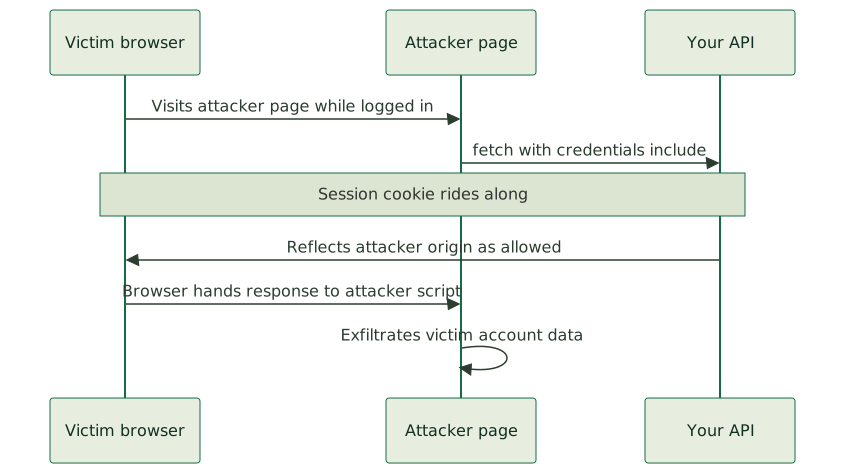
The flow is short and it does not require breaking any encryption or guessing any secret. A victim is logged into your app, so their browser holds a valid session cookie for your domain. The victim, in the same browser, visits a page the attacker controls, perhaps through a phishing link or a compromised ad. That page runs JavaScript that makes a fetch to your API with credentials: 'include'. The browser attaches the victim's cookie because that is what include does. Your misconfigured server responds with headers saying the attacker's origin is allowed and credentials are permitted. The browser, trusting your server's say-so, hands the response to the attacker's script. The attacker reads the victim's account data, tokens, or anything else that endpoint returns, and exfiltrates it.
No malware, no man-in-the-middle, no stolen password. Just a header that said yes to the wrong site. The blast radius depends entirely on what that endpoint hands back, which is why scoping API tokens so a leak cannot touch everything and masking PII in public API responses by default limit the damage even when CORS slips.
The strict policy that closes the hole
The fix is not complicated, and it comes down to refusing to trust the request to tell you who it is.
- Maintain an explicit allow-list of trusted origins. Hardcode the exact origins your frontend uses, like
https://app.yourcompany.com. When a request comes in, check itsOriginagainst that list. If it matches, setAccess-Control-Allow-Originto that specific origin. If it does not match, do not set the header at all. Never derive the allowed origin from the request itself. - Never reflect the Origin header without validation. Echoing the incoming origin is the core mistake. Validate against your list first, every time.
- Never combine a wildcard with credentials. For any endpoint that requires authentication or returns sensitive data, the allowed origin must be a specific, listed origin, not
*. - Use your framework's CORS middleware with strict rules. Most frameworks ship a CORS middleware that takes an explicit list of origins. Use it, configure it tightly, and resist the urge to set it to "allow all" to make development easier, because that setting has a way of surviving into production. CORS controls who can read the response; it does not authorize the mutation itself, so it sits alongside, not in place of, CSRF protection that survives OAuth callbacks.
const ALLOWED = new Set([
  "https://app.yourcompany.com",
  "https://admin.yourcompany.com",
]);

function applyCors(req, res) {
  const origin = req.headers.origin;
  if (ALLOWED.has(origin)) {
    res.setHeader("Access-Control-Allow-Origin", origin);
    res.setHeader("Access-Control-Allow-Credentials", "true");
    res.setHeader("Vary", "Origin");
  }
  // unlisted origins: send nothing, the browser blocks the read
}
The Vary: Origin header matters too. Without it, a cache might store a response with one allowed origin and serve it to a request from a different origin, leaking your allow-list logic. Small detail, real consequence.
Why this hides from your own testing
The reason CORS misconfigurations are so widespread is that they are invisible from inside your own application. Your frontend works perfectly, because your frontend's origin is, of course, allowed. Every test you run from your own app passes. The hole only opens when a request arrives from an origin you did not intend to allow, and you are not testing from those origins, so you never see it. It is the same blind spot that hides a leaked admin path until you stop leaking your admin login URL in redirects and errors: the flaw is invisible from the inside. This is exactly the kind of flaw that does not surface until someone is actively looking for it, which is why it belongs in a real security audit and not in your normal feature testing.
The deeper lesson is one that runs through all of web security: never trust input the request controls to make a security decision. The Origin header is set by the browser but originates from the page making the request, and a security boundary that asks the requester to identify itself and then believes the answer is not a boundary at all. The same instinct that makes you kill SQL injection with parameterized queries and allowlists and accept file uploads without opening a remote code hole applies here. The request tells you what it wants. Your server decides what it is allowed to have, from a list it controls.
Check yours today
This one is worth checking right now, because the fix is small and the exposure is large. Pull up your API's response headers on an authenticated endpoint. Look at Access-Control-Allow-Origin. If it is * on an endpoint that returns user data, or if it changes to match whatever origin you send, you have the hole. If it is a fixed, specific origin from a list you maintain, you are in good shape.
The header that made the red error disappear was never the real fix. The real fix is a short allow-list and the discipline to never let the request decide who it is. When we harden a web app, this is one of the first headers we read, right alongside the rest of the security headers every Next.js app should ship, because it is one of the most common places a team has quietly left the door open without ever knowing it was ajar.