





Set Up SPF, DKIM, and DMARC So Your Mail Stops Hitting Spam
The DNS records, alignment rules, and report-reading that move a cold domain from spam to the primary inbox under Gmail and Yahoo's rules.

You send a perfectly normal email, to a real customer, from your own domain, and it lands in spam or gets bounced outright. Nothing about the content is wrong. The problem is that the receiving server cannot prove the email actually came from you, so it treats it like every other forged message claiming to be your domain. Gmail and Yahoo made authentication mandatory for bulk senders in February 2024, and starting November 2025 Gmail tightened the screws further: non-compliant mail now faces outright rejection at the SMTP level rather than just being filtered to spam.
To make SPF, DKIM, and DMARC actually pass, publish all three DNS records and get alignment right: SPF authorizes your sending servers, DKIM signs each message with a key of at least 1024 bits, and DMARC ties them together. The piece most people miss is alignment, where the visible From domain must match the domain that passed SPF or DKIM, not just any passing check.
The fix is three DNS records and an understanding of one concept called alignment. SPF, DKIM, and DMARC together let a receiving server verify that an email genuinely originated from a sender you authorised, and that it was not tampered with on the way. Set them up correctly and a cold-started domain moves from the spam folder to the primary inbox. Set them up almost-correctly, which is where most people land, and you pass the syntax check while still failing the requirement that matters.
What each record actually proves
These three are not redundant. Each proves a different thing, and Gmail and Yahoo now require all three working together.
SPF (Sender Policy Framework) answers "is this server allowed to send for this domain." You publish a TXT record listing the IPs and services permitted to send on your behalf. A receiving server checks whether the connecting server is on that list.
DKIM (DomainKeys Identified Mail) answers "was this message altered, and was it signed by the domain." Your sending server signs each message with a private key, and a public key in your DNS lets the receiver verify the signature. If the body or key headers were changed in transit, the signature breaks. Yahoo requires a DKIM key of at least 1024 bits, and 2048 is the sensible modern default.
DMARC (Domain-based Message Authentication, Reporting and Conformance) ties the two together and tells receivers what to do when checks fail. It also enables the reporting that makes the whole thing diagnosable, which we will come back to.
The concept that trips everyone: alignment
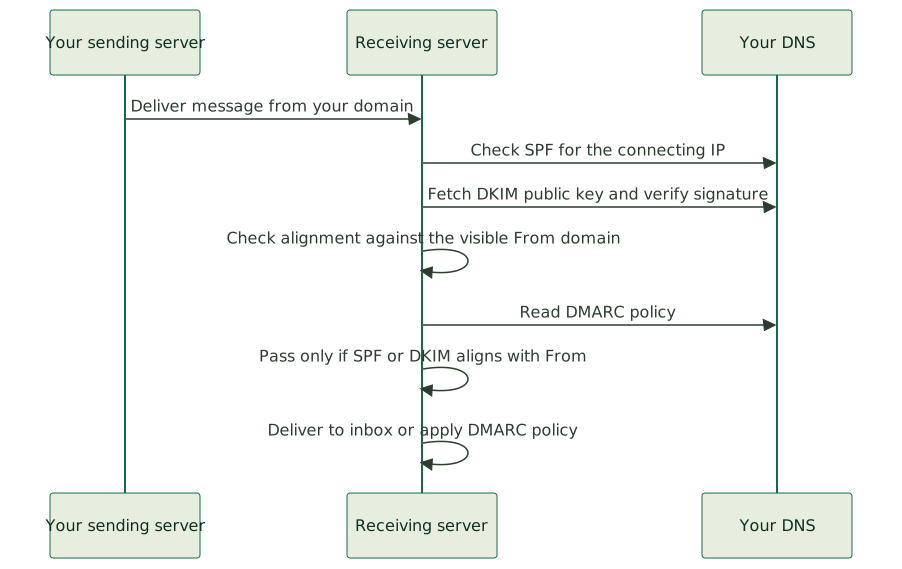
Here is the trap. You can have a passing SPF record and a passing DKIM signature and still fail DMARC, because DMARC does not just want SPF or DKIM to pass, it wants them to align with the domain in your visible From address.
Alignment means the domain a human sees in the From header matches the domain that authenticated. SPF authenticates the return-path (envelope) domain, which is often not the same as your From domain, especially when you send through a third-party service that uses its own bounce domain. DKIM authenticates the signing domain. DMARC passes only if at least one of those aligns with your From domain.
This is why "I set up SPF and it passes" is not enough. A bulk-sending source that has DMARC and SPF but no DKIM will still fail Gmail and Yahoo's requirements, because without an aligned DKIM signature, a forwarded message (which breaks SPF) has nothing left to authenticate against. You need DKIM signing on your From domain, aligned, for the setup to hold up across forwarding and the real conditions mail travels through.
The setup order that works
Do these in sequence, and give DNS time to propagate between steps.
1. SPF
Publish one TXT record at your domain root listing your authorised senders. Include your mail server's IP or hostname and any third-party services that send on your behalf (your email provider, a marketing platform, a transactional sender).
v=spf1 include:_spf.yourprovider.com ip4:203.0.113.10 -all
The -all at the end means "reject anything not on this list," which is what you want once you are confident the list is complete. Keep the record to a single SPF entry. Two SPF records on one domain is a configuration error that causes a permanent failure. And mind the ten-DNS-lookup limit SPF imposes, because stacking too many include statements blows past it and breaks the record.
2. DKIM
Generate a keypair through your sending platform, publish the public key as a TXT record at the selector your platform specifies, and enable signing. Every service that sends for you needs its own DKIM key set up; the most common failure is signing your transactional mail but forgetting the marketing platform, which then sends unsigned mail under your domain and drags down your reputation.
3. DMARC, starting at none
Only after SPF and DKIM are live and passing should you publish DMARC. Allow roughly 48 hours after the first two before adding it. Start at the monitoring policy, p=none, with a reporting address:
v=DMARC1; p=none; rua=mailto:[email protected]; adkim=s; aspf=s
p=none enforces nothing yet, it just turns on reporting. This is deliberate. You want to read the aggregate reports for a couple of weeks first, because they tell you every source sending under your domain, including the legitimate ones you forgot about and the forgers you did not know existed. Only once the reports confirm every legitimate sender is aligned do you tighten to p=quarantine and eventually p=reject, a transition with its own pitfalls covered in moving DMARC from none to reject without killing legitimate email. Going straight to p=reject on day one is how a company accidentally blocks its own invoice emails.
The non-authentication requirements you cannot skip
Authentication is necessary but not sufficient. Gmail and Yahoo's bulk-sender rules carry operational requirements that bounce your mail regardless of perfect DNS:
- One-click unsubscribe. Bulk senders must include a working one-click unsubscribe (the
List-Unsubscribeheader), and must honour requests within two days. A broken or missing one is a fast track to the spam folder. - Spam complaint rate under 0.3 percent. Cross it and you get throttled and penalised immediately, which is why driving your spam complaint rate under the 0.3 percent line is a discipline of its own. The practical target is under 0.1 percent, which you hold by emailing people who actually want your mail, segmenting aggressively, and meeting Google and Yahoo's full bulk-sender rules before they throttle you.
- Valid forward and reverse DNS on your sending IP, and TLS for transmission.
- A clean IP that is not on a blocklist. If a shared IP picked up a listing from another sender, your perfectly-authenticated mail still bounces, and getting your IP off Spamhaus and other blocklists fast becomes the urgent task. Whether you sit on a shared or dedicated IP is itself a decision to make before you send a single email.
None of these are about the records. They are about behaving like a sender people want to hear from, and the platforms now measure that as strictly as they measure your SPF.
Why a cold domain still struggles even when everything passes
A brand-new domain with perfect SPF, DKIM, and DMARC will still see early mail treated cautiously, because it has no sending reputation yet. Reputation is earned by sending consistent, wanted mail over time. The way through is warming: warm a brand new sending domain to full volume in six weeks by starting with low volume to your most engaged recipients, growing gradually, and letting positive engagement signals (opens, replies, no complaints) build the domain's standing before you scale up. Authentication gets you eligible for the inbox. Reputation gets you into it.
This is the part that turns a checklist into a craft, and it is the work behind our email deliverability service: not just publishing the records, but reading the DMARC reports, finding the unaligned sender nobody remembered, fixing the alignment, and warming the domain so mail actually lands. Once the three records hold, putting your verified logo next to every email with BIMI is the visible payoff that only an aligned, enforced DMARC unlocks. If you run your own mail infrastructure, the same care applies to provisioning the accounts and sending stack correctly from the start, and to running a self-hosted mail server that lands in the inbox.
The end state is worth the setup. Mail that authenticates, aligns, and comes from a warmed domain with a clean complaint rate lands in the primary inbox, survives forwarding, and cannot be convincingly spoofed by someone pretending to be you. If your domain is currently fighting the spam folder despite "having SPF set up," the missing piece is almost always alignment or an unsigned third-party sender, and both are findable in an afternoon of reading the reports. If you would rather not read them yourself, that is exactly the kind of thing we do.