





Why Safari Gets 520 Errors When Chrome Works on Your Nginx Server
Large auth cookies plus nginx HTTP/2 field-size defaults silently reset Safari streams; here is the two-line fix.

Here is a bug that wastes entire days because it presents as impossible. Your site works perfectly in Chrome. Every page loads, every form submits, every login goes through. Then someone tries it in Safari, and certain requests, usually POSTs or anything authenticated, fail with a Cloudflare 520 error. Same site, same server, same code. One browser is fine and the other is broken, which feels like it should not be allowed to happen.
It is allowed to happen, and once you know the mechanism it takes two lines to fix. The cause is a collision between how Safari packs cookies, how nginx 1.18 limits header fields, and how Cloudflare reports an origin that hangs up. The reason it eats days is that none of the usual suspects, TLS, firewall, CDN config, are involved, so people chase all three before finding the real one. It is one of a small set of Safari-only puzzles worth recognizing together, alongside why your dev site breaks in Safari but not Chrome on localhost and Next.js 15 pages that render unstyled only in Safari. Here is the actual cause and the fix.
The symptom pattern, so you recognize it fast
The fingerprint of this bug is specific enough that you can identify it before you have done any deep investigation. If your situation matches most of these, you are almost certainly looking at the header-size collision:
- The site works in Chrome but fails in Safari, or any browser that coalesces cookies the way Safari does.
- The failing requests return a Cloudflare 520, with
Server: cloudflareand an HTML error body, typically on POST or authenticated requests. - Your nginx access log shows status
000entries from Cloudflare IPs for the failed requests, meaning nginx accepted the connection but the request was aborted before a complete HTTP request was received. - The nginx error log is silent for those same timestamps. No 4xx, no 5xx, nothing logged, because from nginx's point of view nothing went wrong that it considers worth logging.
- The application uses large session cookies. Supabase chunked auth tokens, Auth0 SDK cookies, NextAuth JWE cookies, anything that stores several kilobytes of session data across one or more cookies. The fatter the auth payload, the more likely this trips, which is part of why keeping tokens lean with JWTs an attacker cannot forge or replay helps in more ways than one.
That combination, browser-specific 520s plus large auth cookies plus an nginx access log full of 000 and an error log that is empty, is the tell. If you see it, you can skip the TLS and firewall investigation entirely.
Why Safari and not Chrome
The difference comes down to HTTP/2 header compression, called HPACK, and a choice the spec leaves up to the browser. When a browser sends cookies over HTTP/2, it can either split them into multiple separate Cookie header fields or combine them all into one. The HTTP/2 standard permits both, and the two major browsers made opposite choices.
Chrome splits cookies into multiple Cookie fields. Safari coalesces every cookie into a single Cookie field. This is a legitimate, spec-compliant decision on both sides; it just happens to matter enormously here, because the limit nginx enforces is per-field.
nginx 1.18 has two relevant defaults. http2_max_field_size caps the size of a single decompressed HPACK header field at 4 kilobytes. http2_max_header_size caps the total decompressed headers at 16 kilobytes. When Safari coalesces several multi-kilobyte auth-token chunks into one Cookie field, that single field blows past the 4 kilobyte per-field limit. nginx, seeing a field larger than it will accept, silently resets the HTTP/2 stream. It does not log an error. It just drops the request.
Cloudflare, sitting in front of nginx, made a request to your origin and got an empty, abruptly-closed response instead of a valid one. It has no better way to describe that than "the origin returned an unknown error," which is precisely what a 520 means. The same Cloudflare-fronted-origin 520 pattern, viewed from the cookie-size angle rather than the nginx-version one, is covered in why your site returns 520 in Safari but works in Chrome. So the chain is: Safari packs the cookies into one big field, nginx 1.18 rejects the oversized field and resets the stream without logging, Cloudflare sees a dead origin response and returns 520. Chrome avoids the whole thing only because it split the same cookies across several smaller fields, none of which individually exceed the limit.
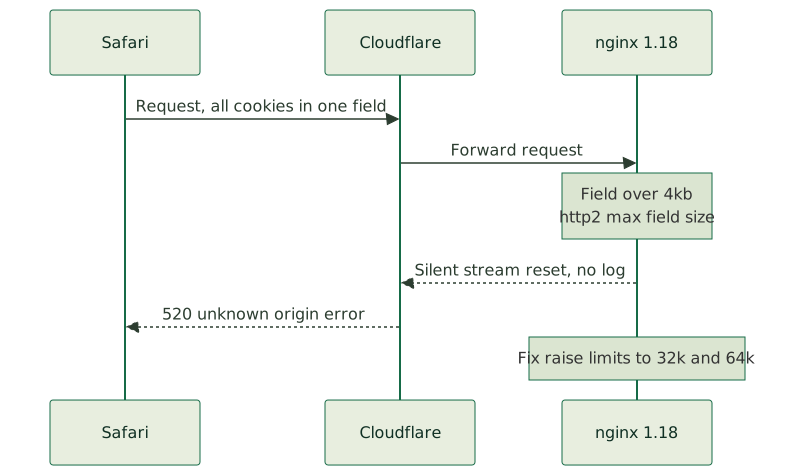
The two-line fix
Once you understand the mechanism, the fix is to raise the per-field and total header limits on nginx so the coalesced cookie field fits. Add these to the affected server { } block:
http2_max_field_size 32k;
http2_max_header_size 64k;
Setting it in the specific server block rather than globally means you are not changing behavior for unrelated vhosts on the same nginx, the same per-server discipline you use when serving unlimited subdomains from one Cloudflare origin certificate. Reload nginx, and Safari's oversized single Cookie field now fits comfortably under the 32 kilobyte ceiling. The stream is no longer reset, the origin returns a real response, and Cloudflare stops returning 520. The Safari-only failure disappears.
One version note that saves confusion: these two directives exist in nginx 1.18 but were removed in 1.19.7 and later, where large_client_header_buffers 4 16k; covers both HTTP/1.1 and HTTP/2 in one setting. So the exact fix depends on your nginx version. On 1.18 you use the two http2_max_* directives; on 1.19.7 and up you tune large_client_header_buffers instead. Check your version first so you reach for the directive that actually exists in it.
Diagnose from the browser, not the server
The reason this bug burns time is that the instinct, when Cloudflare returns a 520, is to assume the problem is on the server or in the CDN, and to start poking at TLS session caches, firewall rules, and Cloudflare settings. None of those are involved, so every hour spent there is wasted.
The fast path is to look at the request in the browser that fails. In Safari, open the Web Inspector, go to the Network tab, click the failing request, and look at the request headers. The Cookie header size is right there. If it is multiple kilobytes packed into a single field, you have confirmed the cause in seconds, before touching the server at all. Get the failing browser's Network tab first, every time a Cloudflare-fronted site has browser-specific 5xx errors, because the cookie size is visible there immediately and it points straight at the fix.
This is exactly the kind of failure that looks like a deep infrastructure problem and is actually a known configuration default meeting a specific browser behavior. Tracing it to the real cause rather than thrashing through the usual suspects is what disciplined server administration is for, and it is the same class of subtle, browser-and-CDN-specific issue that a thorough networking and infrastructure review is built to catch before it reaches a user.
Bake the fix into provisioning, not memory
The last point is about not solving this twice. If you run nginx 1.18 behind Cloudflare and your apps use chunked auth cookies from Supabase, Auth0, NextAuth, or anything similar, this bug is latent on every one of those servers, waiting for the first Safari user to hit a large-cookie request. Solving it per-incident means rediscovering the same mechanism each time someone reports that the site is broken in Safari.
Put the http2_max_field_size and http2_max_header_size overrides into the provisioning template for any nginx 1.18 server fronted by Cloudflare that handles chunked auth cookies, so new servers ship with the larger limits from the start, exactly the kind of correctness an agent you hand your deploy pipeline to can carry forward automatically. Then the bug never appears, because the condition that triggers it, a coalesced cookie field exceeding 4 kilobytes, can never be met. This is the same principle as making your scripts the source of truth so you never fix production by hand: a fix that lives in the provisioning script protects every future server; a fix you remember protects only the one you happened to be looking at.
The mystery, in the end, is not much of a mystery once the pieces are named. Safari coalesces cookies, nginx 1.18 caps a single field at 4 kilobytes, large auth tokens exceed it, and Cloudflare reports the silent stream reset as a 520. The fix is two lines and a reload. The hard part was only ever knowing where to look, and now you do.