





The Safari Only 520 Error That Large Auth Cookies Quietly Cause
How Safari-coalesced cookies overflow nginx HPACK limits behind Cloudflare, and the two-line server block that ends the 520 mystery.

The bug report is maddening because it should be impossible. The site works perfectly in Chrome. In Safari, certain requests fail with a Cloudflare 520 error. Same code, same server, same user, different browser. You check the obvious things, TLS, firewall rules, the CDN config, and find nothing wrong, because nothing is wrong with any of them. The cause is a quiet interaction between how Safari packs cookies, how nginx limits header sizes, and how Cloudflare reports the failure, and once you see it the fix is two lines. Getting to those two lines without knowing the pattern can cost a full day.
We hit this in production and burned hours on the wrong suspects before the real one surfaced. The point of writing it down is so the next engineer who sees "works in Chrome, 520 in Safari, large auth cookies" recognizes it in minutes instead of chasing TLS session caches and firewall rules that were never the problem.
The symptom pattern, so you can recognize it fast
Here is the exact fingerprint. Learn it, because the fix follows directly once you match it.
- The site works in Chrome and fails in Safari, or in any browser that coalesces cookies into a single header field.
- Cloudflare returns a 520 on POST or other requests, with
Server: cloudflareand an HTML error body rather than your application's response. - The nginx access log shows status
000entries from Cloudflare IPs, meaning the connection was accepted and then aborted before a complete HTTP request was received. - The nginx error log is silent for those same timestamps. No 4xx, no 5xx. Nothing logged, because nginx never finished parsing the request to log anything about it. A failure that leaves no log line is exactly the kind that survives until you have turned noisy server logs into alerts you actually trust and know what its absence means.
- Your application has large session cookies. Chunked auth tokens from Supabase (
sb-*-auth-token.0and.1, each a few kilobytes), Auth0 SDK cookies, NextAuth JWE cookies, anything that splits a session across multiple sizeable cookie values. This is the kind of JWT-bearing cookie that grows past 4 kilobytes once it carries real claims.
If your front-end uses fetch, the failure gets worse before it gets clearer. The browser receives the 520 with an HTML body. Your code calls res.json(), which throws because the body is HTML not JSON, the catch block fires, and the user sees a generic "something went wrong" message that tells you nothing about the real cause. The 520 is buried under your own error handling.
Why Safari breaks and Chrome does not
The root cause lives in two places at once: how the browser encodes cookies, and how nginx limits the decoded size.
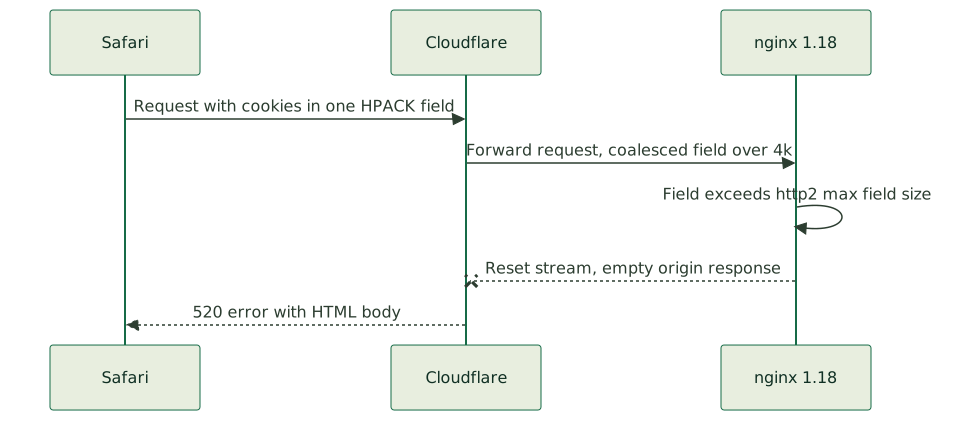
HTTP/2 compresses headers with an algorithm called HPACK. When a browser sends cookies, the spec allows it to either split them into multiple separate Cookie header fields or coalesce them all into one. Both are legal. Chrome splits cookies into multiple fields. Safari coalesces all of them into a single Cookie field. That difference is the entire bug.
nginx 1.18 ships with two relevant HTTP/2 limits:
http2_max_field_size, defaulting to 4 kilobytes, which caps a single header field after HPACK decompression.http2_max_header_size, defaulting to 16 kilobytes, which caps the total decompressed headers.
Now put the pieces together. When Safari coalesces several auth-token chunks into one Cookie field, that single field's decompressed size can exceed the 4-kilobyte http2_max_field_size limit. nginx silently resets the HTTP/2 stream rather than logging an error. Cloudflare, sitting in front of nginx, sees an empty origin response where it expected your page, and translates that into a 520. Chrome never trips this because it split the same cookies across multiple fields, each comfortably under 4 kilobytes, so no single field exceeds the per-field cap.
That is why the same cookies, the same size in total, pass in Chrome and fail in Safari. Chrome's per-field sizes are small. Safari's one combined field is large. nginx limits the per-field size, not just the total. Safari is simply the strict case that exposes a limit Chrome's behavior happens to avoid, the same pattern behind why a site returns 520 in Safari but works in Chrome, why Safari gets 520 errors when Chrome works on your nginx server, and why your dev site breaks in Safari but not Chrome on localhost.
The two-line fix
Once you have matched the pattern, the fix is to raise those two limits in the affected server block.
server {
    # ...
    http2_max_field_size 32k;
    http2_max_header_size 64k;
}
Put it in the specific server { } block for the affected site, not globally, so it does not change behavior for unrelated vhosts on the same nginx. Reload nginx, and the Safari 520 disappears, because the coalesced cookie field now fits comfortably under the raised per-field limit.
One version note that will save you confusion. These two directives exist in nginx 1.18 but were removed in nginx 1.19.7 and later, where large_client_header_buffers covers both HTTP/1.1 and HTTP/2. So the fix above is specifically for the older nginx that still has the separate HTTP/2 directives. If you are on a newer nginx and seeing the same symptom, reach for large_client_header_buffers 4 16k; instead.
How to confirm it before you touch anything
The trap that costs the most time is fixing the wrong layer. Before you change a single line of server config, get the evidence, because the evidence is visible in seconds once you know where to look.
Ask the affected user, or reproduce in Safari yourself, and open the Web Inspector network tab. Click the failing request, open the headers panel, and look at the size of the Cookie header on the request. If it is large, several kilobytes packed into one field, and the response is a Cloudflare 520, you have confirmed it. The cookie size is right there, no guessing required.
This is the discipline that turns a day into ten minutes: when a Cloudflare-fronted site shows browser-specific 5xx errors, look at the browser's network tab before you touch TLS, the firewall, or the CDN. The oversized cookie header is visible immediately, and it points you straight at the HPACK field-size limit rather than the half-dozen plausible-but-wrong suspects you would otherwise work through one at a time. We learned this the expensive way, chasing TLS session caches and firewall rules on a site that was failing only in Safari, before the network tab showed the real culprit in seconds.
Bake it into provisioning so it never bites again
The deeper fix is to stop hitting this per-incident. If you run nginx 1.18 behind Cloudflare and your app uses chunked auth cookies, the raised HTTP/2 field-size limits belong in your provisioning, applied by default to every such server, so a new site never ships with the default 4-kilobyte cap waiting to ambush the first Safari user. This is the scripts-as-source-of-truth discipline we wire into the base configuration when we handle server administration, because a limit that fails silently and only in one browser is exactly the failure mode that survives testing and surfaces in production in front of real users. Browser-only rendering breaks like a Next.js page that renders unstyled only in Safari belong to the same family.
It also pairs with a broader lesson about how Cloudflare reports origin problems. A 520 means "the origin gave me something I could not work with," which covers a lot of ground, and the HTML error body and the 000 status in your access log are the breadcrumbs that point at a connection aborted before the request completed. When you see that combination, think about what could make nginx reset a stream before logging, and oversized headers is near the top of the list.
The recognition, condensed
Works in Chrome, 520 in Safari, large chunked auth cookies, 000 statuses from Cloudflare IPs in the access log, and a silent error log. That fingerprint means Safari coalesced your cookies into one HPACK field that exceeded nginx 1.18's 4-kilobyte http2_max_field_size, nginx reset the stream, and Cloudflare turned the empty response into a 520. Raise http2_max_field_size and http2_max_header_size in the affected server block, reload, and it is over.
Confirm it from the browser's network tab before you touch the server, because the cookie size is visible there in seconds, and the seconds you spend looking save you the hours you would otherwise spend on the layers that were never broken.